

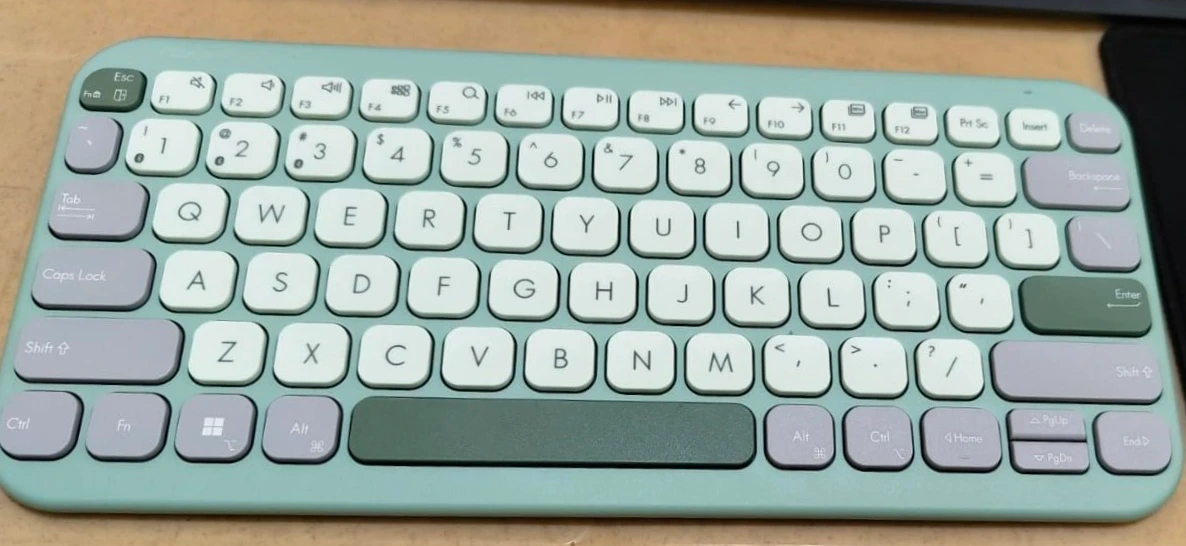
ASUS Marshmallow KW100 Wireless Keyboard - Dedicated Copilot Key
Our Verdict & Practical Summary
The ASUS Marshmallow Keyboard KW100 is a pretty, compact wireless keyboard that looks modern and feels super light in your hands.
It uses whisper-quiet keys that do not make annoying clacking sounds, making it a wonderful everyday pick for study desks and small school bags.
While the plastic body feels slightly light, the 2-year battery life gives you amazing value for your money.
Design, Features & Performance Analysis
The ASUS KW100 immediately grabs your eye with its smooth Iridescent White finish that shifts color gently under bright room lights. It weighs just 375 grams, which means you can slide it into your school backpack alongside your books without feeling extra load.
The keyboard uses a compact layout with rounded keycaps that look friendly and modern, like sweet candy drops. The built-in slight tilt helps your wrists sit at a natural angle, so your hands do not hurt even after typing long homework essays or project notes for hours.
In everyday use, the typing experience feels delightfully quiet and smooth. ASUS uses laptop-style scissor switches with special dampening foam inside, so pressing down on the keys produces almost no noise. You can type fast inside a silent library or late at night in your bedroom without waking up your family.
The board also features a dedicated Copilot key on the bottom row, allowing you to call up Microsoft’s smart assistant with a single tap to answer homework questions or search ideas. Connecting to your laptop, tablet, or iPad through Bluetooth happens quickly and stays steady without dropping signals.
Power efficiency is where this keyboard truly shines for everyday students. It runs on standard replaceable batteries that can last up to 2 years, meaning you almost never have to worry about running out of power during an important school assignment. Because there are no messy charging cables, your desk always stays tidy and free of clutter.
Keeping the keyboard clean is straightforward—just wipe down the white plastic with a dry microfiber cloth, though you do need to keep dusty snacks away to keep that bright white surface looking fresh.
✅ Pros (Reasons to Buy)
- Super quiet scissor keys let you type in silent rooms without disturbing anyone.
- Ultra-light 375g build slips easily into any backpack for school or library visits.
- Long battery life lasts up to 2 years without annoying weekly recharging.
- Dedicated Copilot key opens the smart AI helper with a single push.
❌ Cons (Things to Consider)
- The all-white finish can pick up fingerprints and pencil marks easily over time.
- It does not have backlit keys for typing in completely dark rooms.
- The compact layout does not include a separate, full-sized number keypad.
📋 ASUS Marshmallow KW100 Wireless Keyboard - Dedicated Copilot Key - Full Technical Specifications
| Compatible Devices | Laptop |
| Connectivity Technology | Bluetooth |
| Product Features | Copilot Key, Integrated Stand, Lightweight, Portable |
| Power Source | Battery Powered |
| Switch Type | Scissor-Switch |
| Keyboard Layout | QWERTY |
| Hand Orientation | Ambidextrous |
| Compatible Operating System Family | Windows laptops, MacBooks, iPads, iPhones, and Android tablets. |
| Number of Keys | 104 |
| Colour | Iridescent White |
| Item Dimensions L x W x H | 28.2L x 13W x 18.4H Centimeters |
| Enclosure Material | Plastic |
| Brand Name | ASUS |
| Keyboard Description | Multimedia |
| Model Number | KW100 KEYBOARD/WH/IN/80 |
| Model Name | Marshmallow Keyboard KW100 |
| Generation | 3rd Generation |
| Manufacturer Part Number | 90XB0880-BKB580 |
| Warranty Description | 1 year warranty provided by the manufacturer from date of purchase |
Buying Advice
Who Should Buy?
Students, teachers, and daily laptop users who want a cute, super-quiet wireless keyboard to carry easily between classes, home, and coffee shops.
Who Should Avoid?
Competitive gamers or finance workers who need a heavy mechanical frame, bright RGB lighting, and a big separate number pad for rapid math calculations.
Check Latest Price on Amazon 🛒
Does this keyboard work with iPads and Android tablets?
It connects easily using Bluetooth with Windows laptops, MacBooks, iPads, iPhones, and Android tablets.
Are the keys loud when you type quickly?
The keys are designed with silent scissor switches and foam dampening so they make almost no noise at all.
What does the special Copilot key do?
Pressing the Copilot key instantly opens the Microsoft AI assistant on Windows PCs to help answer questions and search topics.
Does the keyboard need to be plugged into a wall charger?
It runs on standard replaceable batteries that can last up to 2 whole years before needing a change.